v1.0
 FS-Addons
 75r Software
 Dummy Flightsimulator.exe
Software Downloads
 Abt's Fuelplanner
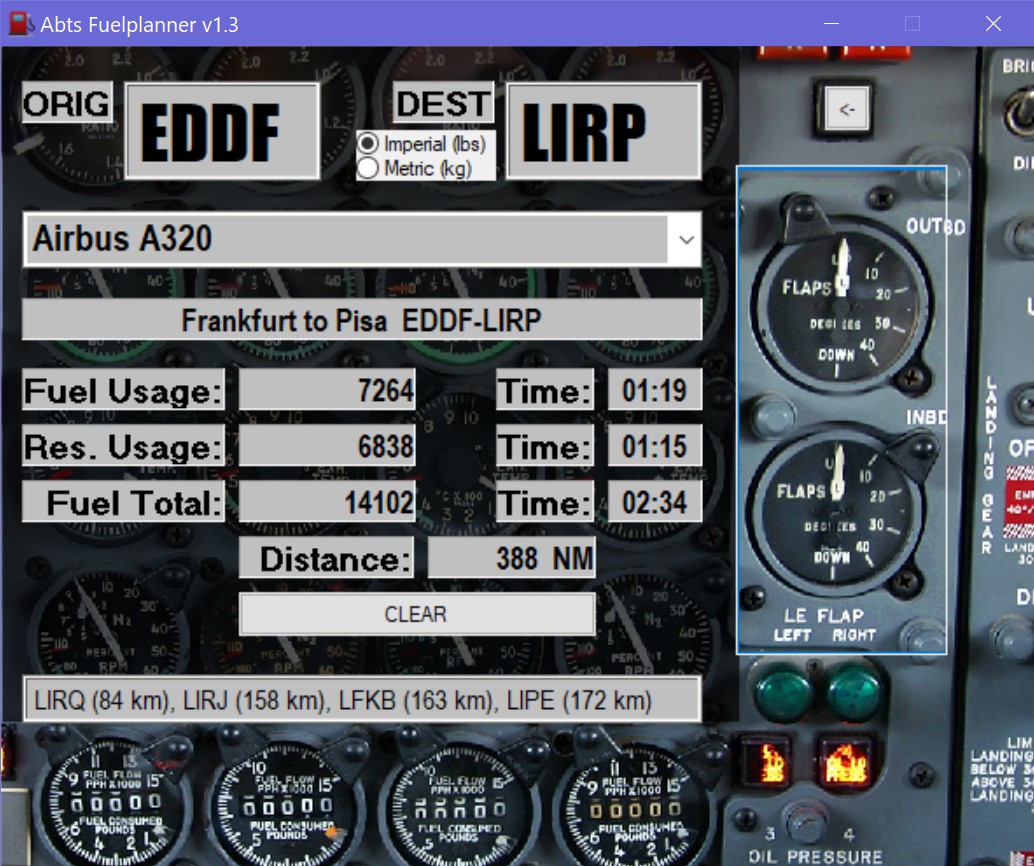
Abt's Fuelplanner is a free software that lets You calculate the distance and the fuel required for a flight with any flight simulator.
You can choose from various aircrafts and wether You want the result in imperial or metric units.
No install, just filecopy and easy to use.
You can choose from various aircrafts and wether You want the result in imperial or metric units.
No install, just filecopy and easy to use.
 Smart ILS
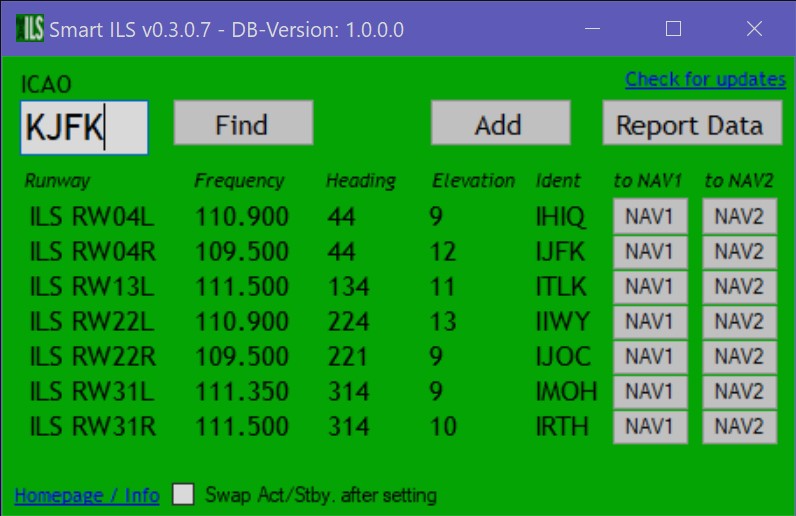
Smart ILS is an easy to use ILS frequency database for Microsoft Flightsimulator. It contains all runways of Flightsimulator which have
an ILS.
It is the only existing tool that provides buttons for every runway ILS-frequency to put the frequency into the NAV radios of Flightsimulator with a single click.
Just type in the ICAO code of the airport and you will get the data of runways with ILS.
Click simply on NAV1 or NAV2 to set the frequency in MS Flightsimulator. Option to report wrong or missing data will be included.
When a number of user-corrections was reveived, a new database version will be released. DB updates - download and install quick and easy within the app.
It is the only existing tool that provides buttons for every runway ILS-frequency to put the frequency into the NAV radios of Flightsimulator with a single click.
Just type in the ICAO code of the airport and you will get the data of runways with ILS.
Click simply on NAV1 or NAV2 to set the frequency in MS Flightsimulator. Option to report wrong or missing data will be included.
When a number of user-corrections was reveived, a new database version will be released. DB updates - download and install quick and easy within the app.
 AuroraAlert
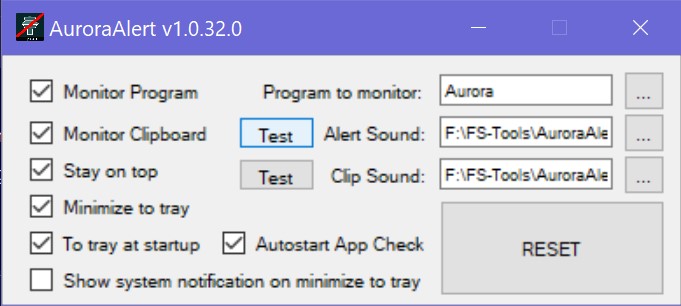
AuroraAlert is a little tool that gives You an alert when IVAO´s (International Virtual Aviation Organisation) ATC software "Aurora" has crashed.
This software crashes from time to time and You might have this running in the background. So You would not be aware of Aurora not longer running.
AuroraAlert let You choose an alarm soundfile (or use those which are included) that will play immediately in case Aurora has crashed. It runs in the system tray and starts monitoring automaticly if You wish so.
Just unzip all included files into a directory and launch AuroraAlert.exe.
This software crashes from time to time and You might have this running in the background. So You would not be aware of Aurora not longer running.
AuroraAlert let You choose an alarm soundfile (or use those which are included) that will play immediately in case Aurora has crashed. It runs in the system tray and starts monitoring automaticly if You wish so.
Just unzip all included files into a directory and launch AuroraAlert.exe.
 MSFS Addons Updater
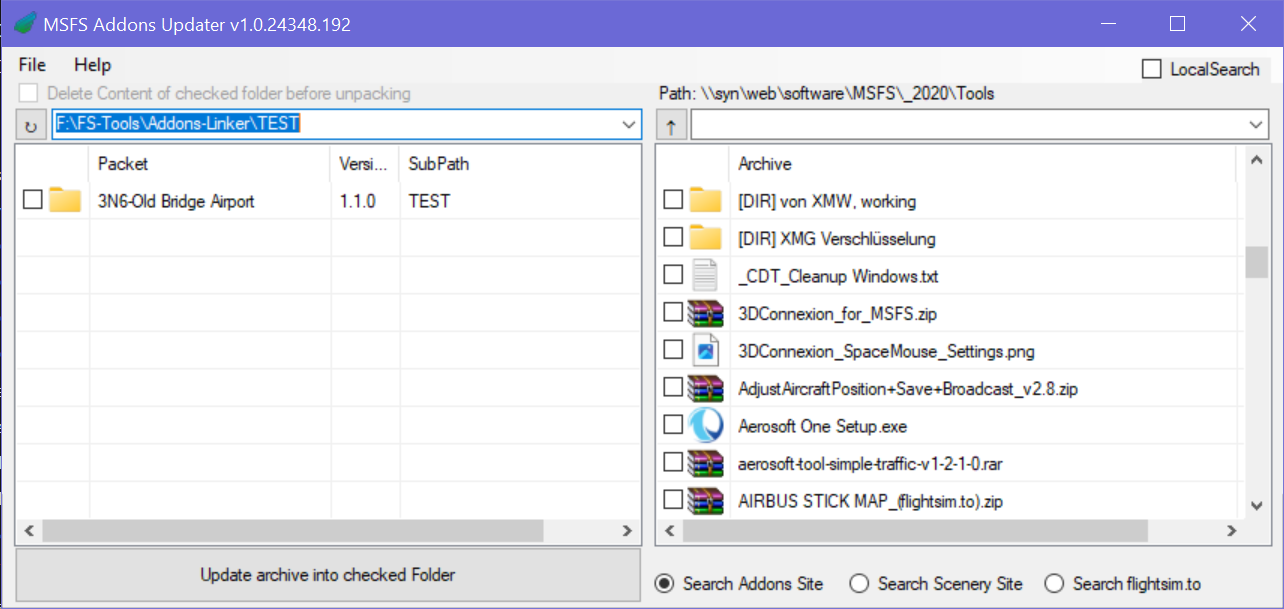
MSFS Addons Updater is a tool, for handling Your installed MSFS Community pakets.
You can define a unlimited number odf Addons folders (Aircraft, Scenery, ...) (Addons Linker (flightsim.to) recommended!), where theruis subdirectories the installed addons pakets are. Their version number is displayed in the list.
On the right side is Your Download Pool with the downloaded .rar and .zip archives. MYou can check their version by their name or by doubleclicking the file which opens You archive viewer. They can automaticly be extracted into Your desired addons folder (WinRAR is required for .rar files!). The download archive (called "SourceDir") can be browsed and You can search files by entering a seartchterm as well as You can search for addons on two different User-defined websites of Your choice. You do not need to use Your Browser to search for addons, the search results just appear in MSFS-Addons-Updater.
Just unzip all included files into a directory, open the README file (!) and launch MSFS-Addons-Updater.exe. A setup dialog appears, for enering the required folder paths.
You can define a unlimited number odf Addons folders (Aircraft, Scenery, ...) (Addons Linker (flightsim.to) recommended!), where theruis subdirectories the installed addons pakets are. Their version number is displayed in the list.
On the right side is Your Download Pool with the downloaded .rar and .zip archives. MYou can check their version by their name or by doubleclicking the file which opens You archive viewer. They can automaticly be extracted into Your desired addons folder (WinRAR is required for .rar files!). The download archive (called "SourceDir") can be browsed and You can search files by entering a seartchterm as well as You can search for addons on two different User-defined websites of Your choice. You do not need to use Your Browser to search for addons, the search results just appear in MSFS-Addons-Updater.
Just unzip all included files into a directory, open the README file (!) and launch MSFS-Addons-Updater.exe. A setup dialog appears, for enering the required folder paths.
 Dummy Flightsimulator.exe


Dummy Flightsimulator is a little program for MobiFlight SimConnect connections via LAN.
If You want to run Mobiflight on a different PC than the Flightsim-PC, Mobiflight needs to see a running "flightsimulator.exe" for a successfull initialization.
So Mobiflight finds a flightsimulator an the same machine and is happy. And You are happy, because the Dummy Flightsimulator is lightweight and does consume almost no CPU-power. And Your Sim-PC is a little lighter, because addon-programs like Mobiflight run on a different computer.
Dummy Flightsimulator can start Mobiflight and can be stopped automatically, when Mobilflight exits. It lives in the tray, from where You also can stop both, Mobiflight and Dummy Flightsimulator itself.
Installation is very easy:
Just unzip flightsimulator.exe and settings.ini into a folder of Your choice. (If it is a folder where You can directly write to, makes editing of "setings.ini" more easy. So "C:\Program Files" is not the best choice. Make shortcut to Your startmenu or to Your desktop (or even better: Use MSFS Launch Helper - also from fs-addons.de - which can let Dummy Flightsimulator start with MSFS).
A comrehensive guide how to install and configure Mobiflight and SimConnect for a remote connection is included in the -zip file.
Dummy Flightsimulator can start Mobiflight and can be stopped automatically, when Mobilflight exits. It lives in the tray, from where You also can stop both, Mobiflight and Dummy Flightsimulator itself.
Installation is very easy:
Just unzip flightsimulator.exe and settings.ini into a folder of Your choice. (If it is a folder where You can directly write to, makes editing of "setings.ini" more easy. So "C:\Program Files" is not the best choice. Make shortcut to Your startmenu or to Your desktop (or even better: Use MSFS Launch Helper - also from fs-addons.de - which can let Dummy Flightsimulator start with MSFS).
A comrehensive guide how to install and configure Mobiflight and SimConnect for a remote connection is included in the -zip file.
 MSFS Launch Helper

MSFSLaunchHelper is a launcher program for MS Flightsimulator 2020 & 2024, that can start any programs along with MSFS and handle SimConnect configurations for using hardware or software that uses SimConnect like Mobiflight over a LAN.
So You can run Mobiflight on a separate PC and free a little Your Sim-PC.
(If You want to use Mobiflight on another PC, You will need in addition another little program "Dummy Flightsimulator.exe", which let Mobiflight think, Flightsimulator is running on the same PC. You will get this little program as well from fs-addons.de.)
FEATURES
A comprehensive manual is part of the .zip File.
(If You want to use Mobiflight on another PC, You will need in addition another little program "Dummy Flightsimulator.exe", which let Mobiflight think, Flightsimulator is running on the same PC. You will get this little program as well from fs-addons.de.)
FEATURES
- Easy and quick setup
- Generates/changes SimConnect.cfg and SimConnect.xml for SimConnect remote connections/li>
- Provides network test-tools for testing the SimConnect LAN connections
- Can Launch MSFS 2020/2024 together with up to 10 userdefinable Addons
- Provides different tools like
- Open/close firewall ports for SimConnect with one click
- Open package path in Explorer with one click
- Open Community folder with one click
- ... more to come!
A comprehensive manual is part of the .zip File.
Contact
Just write a comment, report a bug, get help or suggest a feature.
Please donate!
If you like my software I would be very happy, if you donate something by buying me a coffee:

Or You buy me a beer via PayPal (while ko-fi.com does not take any fees, PayPal will keep almost 30 cent of a dollar...)
You can do so by sending something from $1 or more as you wish via PayPal by pressing the "donate"-button :)
Or You buy me a beer via PayPal (while ko-fi.com does not take any fees, PayPal will keep almost 30 cent of a dollar...)
You can do so by sending something from $1 or more as you wish via PayPal by pressing the "donate"-button :)